AI Actions: Set up your events by just asking
Jul 9, 2026
Setting up a tournament the old way means clicking through a lot of screens: add each round, pick the course, choose the tees, wire up the games, then build the pairings by hand. A multi-round Ryder Cup or a full league season is a lot of taps. Get one detail wrong and you are back in the settings hunting for it.
Squabbit's AI assistant can now do all of that for you. Tell it what you want in plain English and it fills in the setup, opens the right screen, and shows you the result to confirm. Not just answering questions about the app anymore: it actually makes the changes.
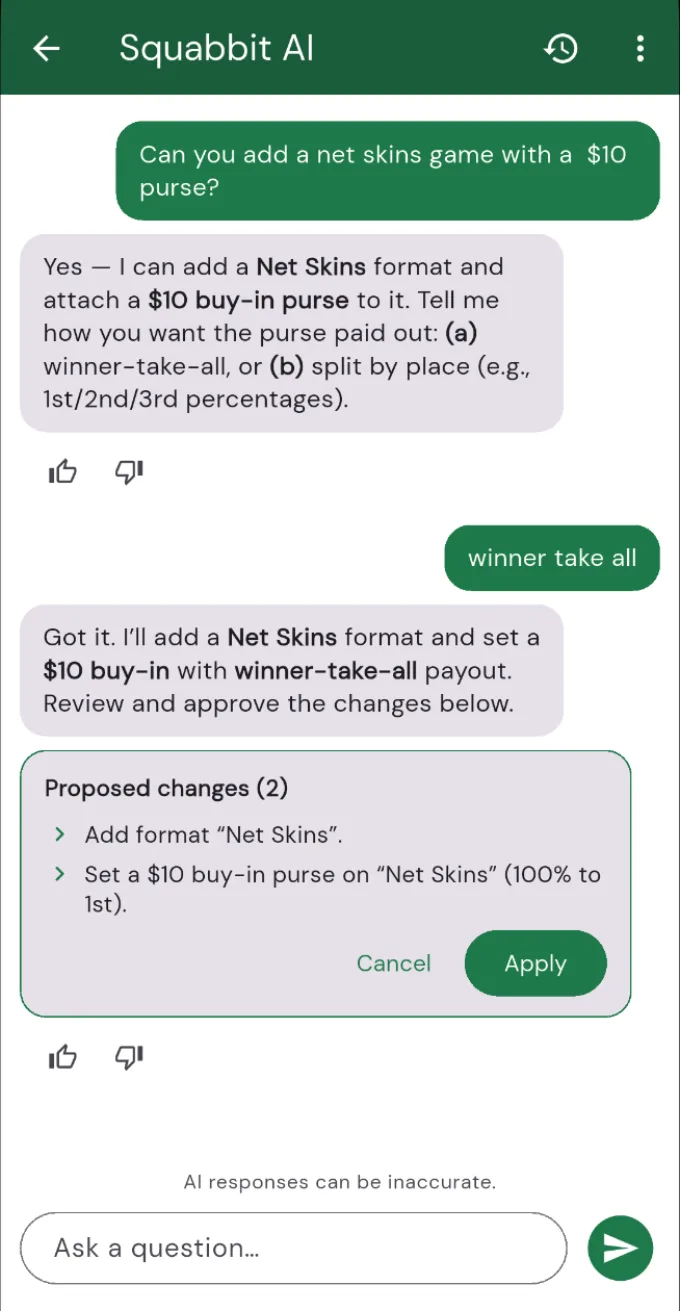
Just tell it what you want
Open the AI assistant with the sparkle icon at the top of any tournament or league page, or from the Help tab. Then describe the event the way you would to a friend:
- "Create a 3-round Ryder Cup, USA vs Europe, with fourball and foursomes on days one and two and singles on the last day."
- "Set round 2 to Pebble Beach, blue tees."
- "Add a net skins game with a $10 purse, winner take all."
- "Set up a Wednesday night league: 12 weeks starting July 8, net stroke play."
The assistant reads what you asked for, sets it up, and hands you off to the matching setup screen so you can see exactly what it changed before you save. Nothing happens behind your back.
Built for real formats
This is not just a shortcut for the basics. The assistant handles the setup that used to take the longest:
- Courses and tees per round, so each day of a multi-round event plays where it should.
- Ryder Cup with per-round games, pairings, and sub-pool handling built in.
- League seasons configured in bulk: set up several events in one go instead of repeating yourself for each one.
It remembers the conversation
Setup is rarely one instruction. Say "actually make round 3 a scramble" or "swap those two pairings" and the assistant keeps the thread of what you have been building. You can go back and forth until the event looks right, then confirm.
Give it a try
Whether it is a single weekend outing or a season-long league, the assistant turns setup from a click-through chore into a conversation. Tell Squabbit what you want and let it do the wiring.
To try it, open one of your tournaments or leagues, tap the sparkle icon at the top of the page, and tell the assistant what you want. It needs to be inside a specific event to make changes, so that is where the magic happens.